I2C OLED
Draw a checkerboard on an OLED display over I2C (picoruby-i2c).
I2C is the second common way for devices to communicate. Here you will drive a small OLED display.
Parts
- An SSD1306 OLED display module (128×64, I2C, 4 pins)
Circuit
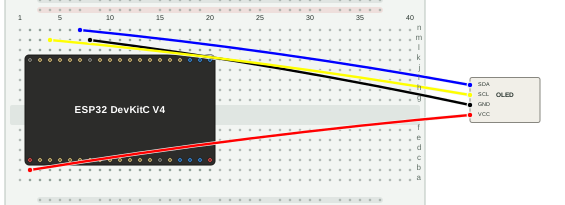
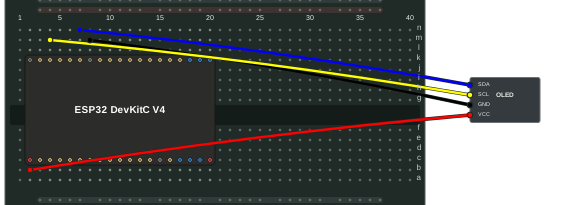
| OLED module | ESP32-DevKitC |
|---|---|
| VCC | 3V3 |
| GND | GND |
| SCL | GPIO22 |
| SDA | GPIO21 |
Program
Driving an OLED means sending commands and data in the format its datasheet
specifies, so this program is a bit more involved. It uses the I2C class to
send the initialization commands, then writes the pixel data for a
checkerboard pattern.
require "i2c"

ADDR = 0x3C
CTRL_CMD, CTRL_DATA = 0x00, 0x40
CHUNK = 16
CELL_W = 16  # px
CELL_H = 2   # pages (1page=8px) => 16px

i2c = I2C.new(unit: :ESP32_I2C0, sda_pin: 21, scl_pin: 22, frequency: 400_000)

def cmd(i2c, addr, *bytes) bytes.each { |b| i2c.write(addr, CTRL_CMD, b & 0xff) } end
def data(i2c, addr, bytes) i2c.write(addr, CTRL_DATA, bytes) end

cmd(i2c, ADDR,
  0xAE, 0xD5,0x80, 0xA8,0x3F, 0xD3,0x00, 0x40, 0x8D,0x14, 0x20,0x00,
  0xA1, 0xC8, 0xDA,0x12, 0x81,0xCF, 0xD9,0xF1, 0xDB,0x40, 0xA4, 0xA6, 0xAF
)

# full screen range (horizontal addressing)
cmd(i2c, ADDR, 0x21,0x00,0x7F, 0x22,0x00,0x07)

buf = Array.new(CHUNK, 0)

8.times do |page|
  pb = (page / CELL_H) & 1
  (128 / CHUNK).times do |blk|
    col0 = blk * CHUNK
    CHUNK.times do |i|
      cb = ((col0 + i) / CELL_W) & 1
      buf[i] = (pb ^ cb) == 0 ? 0xFF : 0x00
    end
    data(i2c, ADDR, buf)
  end
end
The module’s I2C address is 0x3C. Some modules use 0x3D; change ADDR
if yours does.
Run
Save the program as i2c.rb and put it in /home on the device (see
File Transfer), then run it from the shell:
$> ./i2c.rb
A checkerboard pattern should appear on the OLED.
On this page