Switch Input
Read a tactile switch with GPIO input (picoruby-gpio).
Once you can write to a pin, read from one. Input alone is enough to build simple games.
Parts
- A tactile switch
Circuit
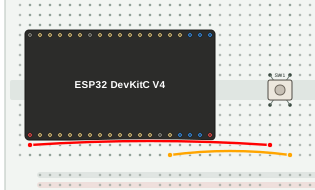
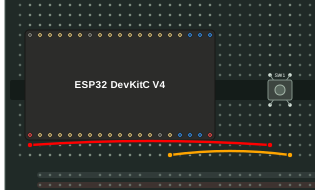
| From | To |
|---|---|
| 3V3 | Switch (one side) |
| Switch (other side) | GPIO13 |
A tactile switch connects the pins that are diagonal to each other when pressed. Adjacent pins may or may not be connected, so use diagonal pins to avoid mistakes.
Note: ESP32 GPIOs are 3.3 V logic and are not 5 V tolerant. Feed the switch from 3V3, not from the 5V pin.
Program
require 'gpio'
require 'machine'

button = GPIO.new(13, GPIO::IN | GPIO::PULL_DOWN)

loop do
  puts "Button: #{button.high? ? 'Pressed' : 'Released'}"
  Machine.delay_ms(1000)
end
The program polls the button once per second and prints its state.
GPIO::PULL_DOWN enables the pin’s internal pull-down resistor, so the pin
reads LOW (released) while the switch is open instead of floating. Look up
“pull-down” if you want to understand why this matters.
Run
Save the program as gpio_in.rb and put it in /home on the device (see
File Transfer), then run it from the shell:
$> ./gpio_in.rb
Button: Released
Button: Released
Button: Pressed
Button: Pressed
Button: Released
The state is printed every second. Press the switch and check that the output changes.
On this page